previous icon Back to blog
Jan 25, 2024
4 minutes read

How to Use WhatsApp Business for Service Automation

The process of refunding or replacing a product is an inherently sensitive situation that can quickly turn into a source of tension or frustration for customers and businesses alike. Let's face it, when we as consumers are looking for a refund or replacement of a product that we’re unsatisfied with, the idea of having to scroll through lengthy pages of information that may or may not be relevant to what we need to know doesn't exactly fill us with joy; nor does the idea of spending extended lengths of time on hold with customer service.

This is where an FAQ chatbot can come in and make a world of difference to your eCommerce business operations, turning a potentially unpleasant back-and-forth exchange of phone calls or emails from unhappy customers into a simple, automated process. By doing so, business owners can make the return or replacement experience both smooth and efficient for the customer, while also obtaining key information about why the person is unsatisfied with the product in the first place.

All of this inevitably results in improved business practices and happier customers. In fact, research has shown that 68% of adults are more likely to buy from a business that they can message directly. That's why brands are constantly looking for new ways to improve dialogue and overall communication with customers by using social messaging platforms and technology such as chatbots and virtual assistants.

Reduce Workload and Automate Communication with WhatsApp Business

It's not just customer satisfaction where this automated service tool comes in handy; it's also a fantastic way to make the best use of your time as a business.

Instead of dedicating their time to more important things, businesses can often get bogged down answering the same questions again and again. This is more than just mundane and repetitive; it's also incredibly time-consuming. Think about it: how much of your customer service operation revolves around processing refunds and answering questions about product replacement that you've dealt with a million times before?

Via the use of a WhatsApp chatbot, you can program completely automated responses to the most common questions related to refunds and replacements, seamlessly integrating these interactions into your customer relationship management system to create a quick, efficient, and hassle-free experience for you and the people who make your business tick.

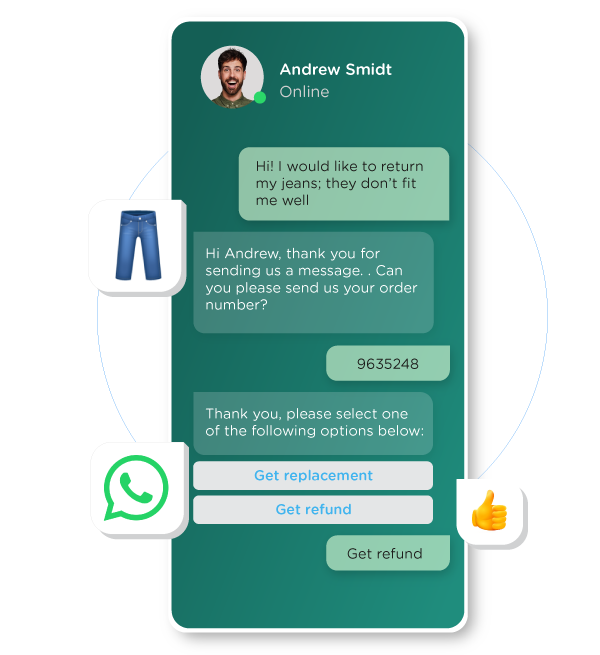
Imagine, for example, that a customer has a particular problem with the size of jeans that they’ve bought. They may simply be looking to return the product with a full refund; or they could be looking for the same kind of jeans in a different size. In either case, your chatbot will be able to offer them a solution to suit their needs.
whatsapp service-automation faq

So, using a chatbot to manage and automate the refund and replacement process saves you and your customers a considerable amount of time, and they in turn will feel satisfied given that their issue has been dealt with quickly and easily.

Of course, not all questions can be answered via chatbot, and in some cases, the best option is to speak to someone in person. If this is the case, give customers the option of asking to be handed over to a live member of staff who can help them with their queries. The key here is to optimize your customer service operations, and WhatsApp Business provides you with the perfect springboard in order to help you do just that.

Get Started With WhatsApp Business for Refund and Replacement

At CM.com, we can help you design a FAQ WhatsApp chatbot that will give your customers the answers they're looking for in real-time on a platform that they're familiar with. You'll be offering the customer simple, clear, and timely responses that will leave them feeling satisfied with the information they've received.


Automate refunds and replacements via WhatsApp

Was this article interesting?
Share it!
CM.com
connects tens of thousands of companies with millions of consumers via their mobile phone each day. Behind the scenes, from our innovative platform, CM.com makes sure companies can use these millions of messages, phone calls and payments to become part of people’s lives.

Latest Articles

blog-meta-conversion-api
Aug 19, 2025 • WhatsApp

Meta's Conversions API for Marketers: Knowledge is Power

In today's competitive digital landscape, data isn't just helpful - it's essential! Tracking data and measuring the results of your marketing efforts should be a vital step in every marketing plan, because marketing success isn’t about who shouts the loudest. It’s about who listens best to their data. That’s why Meta’s Conversions API is an indispensable tool for marketers worldwide.

WhatsApp Marketing
Jul 28, 2025 • Commerce

Could Your Existing Marketing Budget Drive Better Results on WhatsApp? Absolutely.

There’s only one thing you want as a marketer, and that's grabbing the attention of your customers with your ROI in mind. With a popular platform like WhatsApp Business, the reach and engaging nature of the channel are a great place to start. But how do you truly stretch your marketing budget to see better results? By using data to your advantage!

WhatsApp Pay
Jul 24, 2024 • WhatsApp

How to get the WhatsApp Business Green Tick Badge

The WhatsApp Business green tick is the official badge for Meta verified business accounts. It helps users to distinguish between authentic businesses and fake accounts. Many users place high value on the green tick, and brands sporting this badge will see a positive impact on their business. But how can you business apply for the green tick badge? Read all about it below.

WhatsApp New Policy
May 13, 2024 • WhatsApp

Quality Customer Engagement With WhatsApp Business Platform

We all want to get our brand messages out there. We want to engage with our customers, raise brand awareness, and connect with our target audience. WhatsApp Business Platform helps you safeguard the way you communicate with (potential) customers, making sure that you provide them with a meaningful and relevant customer experience to help grow your business.

whatsapp-business-blog_image-tracking-order-updates
Apr 09, 2024 • WhatsApp

How to Use WhatsApp for Tracking and Order Updates

Even the most easy-going among us can get a bit nervous if we don't know what's going on with our order. We've all been there, combing through our emails from the past month searching for payment confirmation, or fretting about whether our product has accidentally been shipped three-quarters of the way around the world to an unknown location, never to be seen again.

whatsapp-business-blog_image-abandoned-carts-stock-wishlist
Apr 09, 2024 • WhatsApp

How WhatsApp Business Can Help With Abandoned Carts Recovery

Picture the scene as a customer: we've made the decision that we're going to buy something and we've added it to the cart, but for whatever reason, we don't follow through with the transaction. Sometimes we forget that we've added items to the cart; other times the phone rings just as we're about to click pay and we forget about it. On other occasions, we see something at the last minute that we don't like the look of that makes us think twice about buying.

whatsapp-business-solution-3-creative-cases
Apr 01, 2024 • WhatsApp

A Starter Guide to WhatsApp Message Templates & Buttons

WhatsApp Business message templates are specific message formats that businesses use to send out notifications, alerts, and customer care messages to people who have opted-in to receive messages. These may include appointment reminders, shipping information, issue resolutions, payment update, and they can be enriched with interactive buttons. Here’s what you need to know about this platform.

Boost Your Sales With WhatsApp Business Product Messages
Apr 01, 2024 • WhatsApp

Boost sales with WhatsApp Business Product Catalogue

Looking for a new way to boost your sales? Want to showcase your products and services on one of the most popular messaging channels today? You might already use WhatsApp Business to engage with your customers, but did you know that you can also use WhatsApp to boost your sales? Let's take a look at how to optimise your WhatsApp Business usage with product messages.

whatsapp-business-message-templates
Mar 03, 2024 • WhatsApp

How to Use WhatsApp Business Message Templates?

There are several ways to use WhatsApp Business to communicate with your customers. One way is via the customer care window, in which case the conversation is initiated by the customer. If you want to reach out to your customer first – once you have received an opt-in from them to do so - you can make use of the so-called Message Templates.

Is this region a better fit for you?
Go
close icon