

Back to blog

WhatsApp Business API - What is a Customer Care Window?

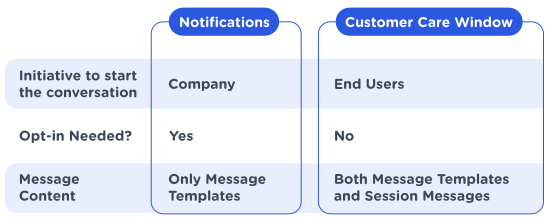
With the WhatsApp Business solution, there are two ways to chat with your customer. Once a customer opts-in to receiving messages from your business, you can initiate a conversation by sending notifications via so-called Messages Templates, or the customer can initiate a conversation with your business.
CM.com
Oct 25, 2021
4 minutes read
Updated Aug 15, 2023

Whenever your customer contacts or replies to you, a customer care window is opened. This customer care window creates more opportunities for you to benefit from the WhatsApp Business Platform.

What is the 24-Hour Rule in WhatsApp Business?

The Customer Care Window is a 24-hour time frame in which you can communicate with customers in a rich conversation using so-called Session Messages, reacting to them in a real-time and interactive chat with rich media capabilities. This means your message is not limited to the pre-approved Message Templates, though Message Templates are possible within a customer care window as well. Moreover, chatting with your customer in this 24-hour customer care window will not be charged the WhatsApp fee.

WhatsApp Business message types

The customer care window ends 24 hours after the last message is sent by the end user. After 24 hours, you will only be able to send a notification via Message Templates. Each time the customer sends you a message, whether this is the conversation initiating message or another reply in the conversation, the 24-hour customer care window will restart. So, from the last message your customer has sent you, you have 24 hours to send custom messages, free of charge unless you exceed your package.

Continue the WhatsApp Conversation With Message Templates

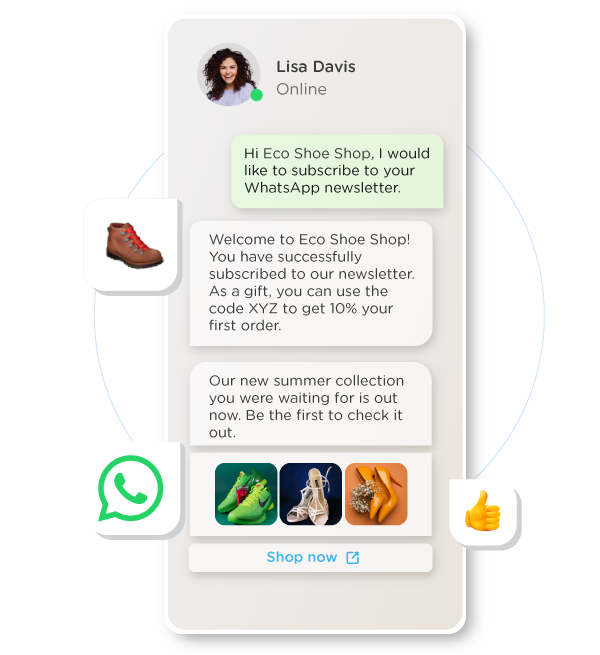
To continue the conversation after the Customer Care Window ends, you can send one single Message Template. However, this is only allowed if you have an active opt-in from the customer. Message Templates give you the opportunity to send a notification to your customer if you need more than 24 hours to solve the customer’s problem.
whatsapp busines marketing newsletters

If your customer then sends a reply to your message, a new customer care window will open, and you will regain the possibility to send session messages.

The purpose of a customer care window and the limitation in messaging possibilities outside that time frame is to ensure the quality of WhatsApp as a customer care channel for customers to engage with their business. By making smart use of Message Templates and the Customer Care Window, you can use WhatsApp as an easy and user-friendly channel for customer care.

Get Started With the WhatsApp Business Platform

Are you looking for an efficient way to use WhatsApp for your business? Then the WhatsApp Business Platform is the way to go. With so much happening on digital platforms these days, why not jump onto the biggest communication platform around, and make use of it to your advantage?


Streamlining customer interactions and improving communication is a great way to save time and improve your business. And on top of this, you can now also give your sales a boost! Definitely something worth looking into, don’t you agree?



Want to start using the WhatsApp Business API to improve your customer care?

Was this article interesting?
Share it!

Latest Articles

Ads That Click to WhatsApp Marketing

Ads That Click to WhatsApp: What Are They and What Are the Benefits?

Successful marketing means creating personal and conversational experiences for your customers. And what better place to meaningfully connect to your customers than on their favorite social media platforms and channels such as Facebook, Instagram and WhatsApp? With ads that click to WhatsApp, aka click-to-chat WhatsApp ads, you can offer your customers the direct and personal engagement that they crave. Read all about it!

5 minutes read Nov 18, 2024
whatsapp pricing WhatsApp

WhatsApp Business Platform: Pricing Changes in 2024 and 2025

WhatsApp Pricing is based on conversation categories with corresponding fees. Read all about the pricing model in this blog. Meta has announced some upcoming pricing changes for 2024 and 2025. Find out what those changes mean for you!

8 minutes read Sep 23, 2024
WhatsApp Pay WhatsApp

How to get the WhatsApp Business Green Tick Badge

The WhatsApp Business green tick is the official badge for Meta verified business accounts. It helps users to distinguish between authentic businesses and fake accounts. Many users place high value on the green tick, and brands sporting this badge will see a positive impact on their business. But how can you business apply for the green tick badge? Read all about it below.

5 minutes read Jun 25, 2024
whatsapp-business-telecom WhatsApp

10 Ways to Optimize the Customer Experience With WhatsApp Business

WhatsApp is one of the dominating apps in the messaging landscape, securing its position as the top messaging channel. According to Statista, WhatsApp stood out as the messaging app with the most active monthly users in 2022.

7 minutes read Jun 24, 2024
WhatsApp New Policy WhatsApp

Quality Customer Engagement With WhatsApp Business Platform

We all want to get our brand messages out there. We want to engage with our customers, raise brand awareness, and connect with our target audience. WhatsApp Business Platform helps you safeguard the way you communicate with (potential) customers, making sure that you provide them with a meaningful and relevant customer experience to help grow your business.

5 minutes read May 27, 2024
engage-platform-effect-customer-service CM.com

Happy Clients, Happy Agents: the Platform Effect in Customer Service

As a member of the customer service team, you stand on the front lines of customer interaction every day. In a world where customers demand quick and personalized service, long wait times, impersonal responses, or worse, incorrect answers, can quickly drive a customer away. Your goal, however, is to connect customers with your organization and deliver the best answers and service possible. It’s incredibly satisfying to see a customer leave a conversation happier and eager to purchase your product. Your efforts can significantly enhance the customer experience, but you need the right tools to truly excel. Integrating these tools into a platform amplifies your capabilities and lets you experience the power of the platform effect.

5 minutes read May 07, 2024
WhatsApp vs Facebook Messenger Messaging

WhatsApp vs Facebook Messenger: Which Messaging Channel is Best for What?

WhatsApp and Facebook Messenger are both established messaging channels for customer engagement. But what are the differences? Which advantages does each channel have for what business use case? Let's dive into the details

7 minutes read Mar 27, 2024
drive-engagement-and-convert-your-conversations-with-whatsapp-carousel WhatsApp

Drive Engagement and Convert Your Conversations With WhatsApp Carousel

Are you already talking to your customers on WhatsApp? You really should! WhatsApp Business Platform, the business communication platform of one of the most popular messaging channels in the world today, has a wide selection of powerful engagement tools to enhance customer communication and boost sales. And they've added another innovative feature under their belt: WhatsApp Carousel.

4 minutes read Feb 06, 2024
WhatsApp Pay WhatsApp

Flexible, Functional, and Rich Interactions with WhatsApp Flows

WhatsApp Business Platform is adding another new and exciting feature to its repertoire: WhatsApp Flows. But what is it and what can you do with it? Let's take a look!

5 minutes read Feb 05, 2024
Is this region a better fit for you?
Go
close icon