Back to blog

Unlike a phone menu or a scripted chatbot, an AI agent handles non-linear conversations. A customer might start with a return question, mention a delivery issue halfway through, and end up asking about a discount code. There is no fixed path, no reset button, no script to measure compliance against. That raises a question that every team deploying AI eventually runs into: how do you actually know if it is working?
The answer, practically speaking, comes down to three things you can say about any conversation:
• What was it about? The topic.
• How did it end? Resolved, unresolved, or handed over to a human.
• How did the customer feel about it? Their feedback.
Everything else follows from those three. We have expanded the analytics capabilities in HALO to make all three visible, connected, and actionable.
Already using HALO? Read everything about HALO Analytics in our Knowledge Center
Topic analysis: start with what your AI is actually being asked
Before you can improve anything, you need to know where to look. When your AI handles a broad range of questions, it is not always obvious where the biggest issues are. A question type that generates a lot of traffic but consistently goes wrong is costing you far more than one that occasionally misfires. Without a topic-level view, those patterns stay hidden.
Topic Analysis in HALO automatically groups conversations by topic and subtopic and visualises them in a Sankey diagram. The diagram connects topic volumes directly to resolution statuses and feedback scores, so you can see at a glance which areas need attention. If returns are generating a lot of unresolved conversations, or if a specific subtopic consistently receives negative feedback, it shows up immediately. That helps you prioritise where to spend your time and avoid working on things that are already performing well.
From the diagram you can click straight through to the underlying conversations, down to the individual message level, and into the Optimize view to act on what you find.
Resolution rate: turn a number into a direction
Once you know which topics are getting the most traffic, the next question is how those conversations are ending. Knowing your overall resolution rate is a start, but a single percentage gives you no direction. It does not tell you where to look or what to fix.
The Resolution Rate breakdown in HALO shows the full picture across four statuses: Resolved, Undetermined, Unresolved, and Handover. You can filter the entire analytics overview by any of these statuses and immediately see which topics or subtopics are pulling down your numbers. That turns a general score into a concrete action: fix the knowledge gap in this subtopic, adjust the flow for that question type. Teams that use this consistently see their resolution rate improve over time without having to guess where to start.
Customer feedback: the part the numbers do not always show
Resolution status tells you how a conversation ended. It does not always tell you how the customer felt about it. The two do not always align. A conversation that HALO classified as resolved might still have left a customer dissatisfied, and without feedback data connected to your operational metrics, you would not know.
The Customer Feedback Score in HALO integrates user ratings directly into the analytics overview. Feedback is collected via the WebConversations widget at the end of a conversation. Users can leave a rating and a short message. That data sits alongside the resolution status and topic for each conversation, so you can see whether satisfaction and resolution are moving in the same direction. If they are not, that is usually a signal worth investigating. A resolved conversation with consistently low ratings often points to an answer that is technically correct but not actually helpful.
For teams not using WebConversations, feedback from other systems can be pushed in via the API so it appears in the same view.
When something goes wrong, you can trace it back and fix it on the spot
The new features sit on top of something that has always been part of HALO: full access to every individual conversation. Every interaction can be opened and read in full. You can see which agents were involved, which handovers occurred, and where the information in each response came from. If a response was based on knowledge content, you can click through to the exact source. If an answer was wrong, you can trace it back to the specific document or flow that caused it and fix it at the origin, rather than having to review your entire knowledge base to find the problem.
That traceability is the foundation. What you can do with it is where it gets more interesting.
From the Optimize view, team members can rate individual answers and flag incorrect responses. But beyond flagging, you can actively shape how HALO responds. If an answer is too long, you can make it shorter. If the tone is off, you can adjust it. If the response is going in the wrong direction entirely, you can correct it. HALO remembers those changes, not just as a log, but as input that influences how it handles similar questions going forward. You can also add targeted knowledge directly to a specific question on the fly, without touching the rest of your knowledge base or triggering a full reconfiguration.
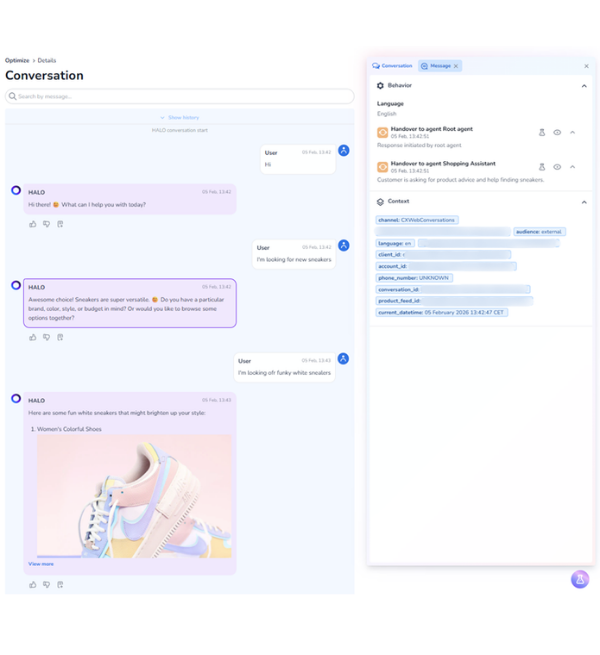
This is a capability that has been part of HALO since the beginning, and one we have not always given the attention it deserves. In a market where most platforms still treat the AI as a black box, something you configure once and hope for the best, this level of in-context quality control remains genuinely rare. We have yet to see a competitor that handles it the same way. The result is an AI that gets more accurate over time through the work your team is already doing, not through separate maintenance cycles or periodic retraining. The more your team engages with it, the less manual effort it takes to keep quality where it needs to be.
Get started with HALO: how to create AI agents in HALO
An AI you can keep improving
Most AI tooling gives you limited visibility into what is happening under the hood. That is fine when everything works, but it makes it hard to improve things when it does not. HALO is built on the assumption that your team needs to be able to see, question, and correct what the AI is doing at any point.
If you are managing AI for customer service, whether you built something yourself, stitched together tools, or are working with a platform that does not give you this level of insight, the gap between running an AI agent and actually managing one comes down to exactly this: can you see what it is doing, and can you act on it?
The new analytics features make that more practical. If you are already using HALO, the Resolution Rate breakdown, Customer Feedback Score, and Topic Analysis are available in your analytics overview now.