
Last update: July 2026
The good news: your existing customer relationships are protected, and all outbound messaging keeps working exactly as it does today. The less-good news: if your CRM, contact resolution, or ad funnel assumes a phone number always arrives with every conversation, parts of that will stop working for new contacts who adopt a username.
Here is what is changing, what stays the same, and what your business needs to do before June.
TL;DR
What's launching: Optional usernames for WhatsApp users. They can choose a handle (like @P.Smith). Additionally, they can choose to hide their phone number when messaging your business.
When: Phased rollout started in June 2026, expanding globally through the rest of the year. BSUIDs (the new identifier) are already appearing in webhooks from CM.com’s Business Messaging API.
What stays the same: Outbound messaging to known phone numbers, authentication templates (one-tap, zero-tap, copy code), and your business profile (your phone number stays visible when you adapt a username for your business).
What changes: New inbound conversations from username adopters will arrive with only a Business-Scoped User ID (BSUID) instead of a phone number, all other messages will also get a BSUID.
The one thing to do as soon as possible: Make sure your CRM and integration setup is ready to store and match on BSUID alongside phone number, before username adoption picks up speed.
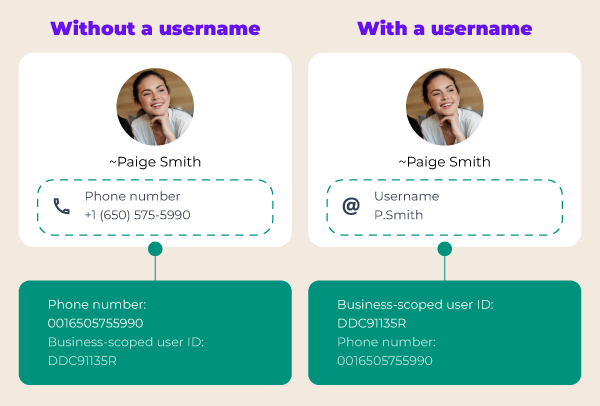 How your customers will be identified before and after the username rollout. Users who don't adopt a username see almost no change. Users who do adopt one are identified by BSUID, with their phone number only available if you've had a conversation with them recently.
What's actually changing
Starting June 2026, WhatsApp users can choose an optional username and use it to start conversations with your business without revealing their phone number. It's a privacy upgrade users have been asking for, and one of the reasons some have drifted toward Telegram or Signal. Adoption will be gradual: the rollout starts in a limited set of countries and expands globally through the second half of 2026.
Meet the BSUID: the new identifier behind the scenes
A username is what your customer sees and chooses. What your systems will see is something different: a Business-Scoped User ID, or BSUID.
The BSUID is a unique identifier that Meta automatically generates for every user-business pair. Think of it as a customer ID for WhatsApp, similar in spirit to the customer IDs you already use in your CRM except it's issued by Meta and it's specific to each user's relationship with your business.
Three things matter about it for now (the rest is in the technical section later):
It identifies a user. Where you used to get a phone number in every inbound message, you'll now get a BSUID instead. The phone number is still there in most cases (more on that in a moment), but the BSUID is the one identifier that's always present for every conversation.
It's tied to your business. The same customer messaging two different businesses gets two different BSUIDs. You can’t share BSUIDs between different Meta Business Portfolios. If this is necessary for your specific case, there are workarounds available. Contact your account manager if this is relevant for your case.
It's mostly stable. Once a customer has a BSUID for your business, it doesn't change if they later remove their username or switch back to use their phone number. Only if a customer changes its WhatsApp phone number, their BSUID is regenerated. In that case a system event will be shared with both the old and the new BSUID for you to update your systems. More information can be found in our developer documentation under BSUID changes.
For most business teams, that's all you need to know. The BSUID is the new way your systems recognize a customer when WhatsApp doesn't hand you a phone number.
What stays the same (the reassurance part)
Before getting into what changes, here is what does not. This is the question most business owners ask first, and the answers are mostly reassuring. The simplest way to think about it is to split your messaging into two flows.
Business-initiated messaging is fully unaffected. Every template-based message you send today keeps working exactly as it does now:
Marketing messages continue to send to known phone numbers.
Utility messages continue to send to known phone numbers.
Authentication messages (one-tap, zero-tap, copy code) remain phone-number-only by design.
User replies to any of the above keep working, as long as the reply arrives within 30 days of your last message to that phone number.
User-initiated messaging is mostly unaffected, with one specific exception. Inbound messages from your existing customer base, from any user who hasn't adopted a username, and from any user already in your Contact Book, all keep arriving with a phone number. The only inbound flow that changes is new conversations from username adopters who aren't already in your contact history. For those, you'll receive a BSUID instead.
A few specific reassurances worth calling out:
Your existing customer base is protected. WhatsApp's Contact Book — a feature Meta launched in early April 2026 — automatically pairs phone numbers with the new identifier for users you have interacted with before. You do not need to re-collect anything.
Your business profile is unchanged. Your business phone number stays visible to users. The privacy benefit of usernames flows one way only: users gain the ability to hide their number from businesses, not the reverse.
The 30-day lookback is generous. It's evaluated per business phone number, so any recent activity on a given number keeps that customer's phone number visible in webhooks for 30 days from the last interaction.
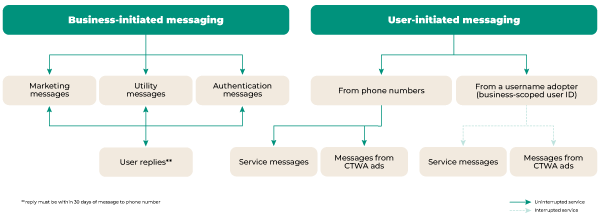 A map of which messaging flows continue uninterrupted (green) and which are affected (light green) if you don't adopt BSUID support. The interruption is narrow: only service messages and Click-to-WhatsApp ad conversations from new username adopters. Everything else — all template types, all replies within 30 days, all messages from non-adopters — keeps working.
In short: most of your day-to-day operations are unaffected. The change shows up at the edges, in two specific scenarios — which we'll cover next.
Your own WhatsApp business username and how it will be displayed
As of July 2026, both businesses and end-users can adopt a WhatsApp username. For businesses, this means you can now reserve your brand's name on WhatsApp, though note that some names may already be reserved.
Why it matters?
Your username won't change anything just yet. Once usernames become available to use, they will make your business easier to find and recognise on WhatsApp.
Two ways to claim your business username
Via WhatsApp Manager
Go to WhatsApp Manager, open Profile, and look for Display name. From there you can submit your preferred username for approval.Via the API
Prefer to do it programmatically? Follow the steps in our documentation under Business usernames: adopting and changing.
What happens after approval?
Once your username is approved, it is secured, but nothing changes on your end for now. We will keep you updated on when usernames go live and what you can do with them.
How will customers see your business name appear on WhatsApp?
Your customers or users will see your business name in the following order
Saved contact name (if your customer has saved your number)
Verified business name or Official Business Account (OBA) name
Username (if you have adopted one)
Phone number (default fallback)
What changes for your operations
The impact is uneven across functions, so here is what changes by who owns what.
For CRM and customer data owners
This is the area with the most direct impact. When a username adopter, new to your business, messages you for the first time, the inbound webhook will contain only a BSUID, no phone number. A few additional properties matter at the implementation level:
The BSUID is alphanumeric, up to 128 characters, and includes a country-code prefix (for example, NL.13491208655302741918).
It's permanent for that user-business relationship, so once you've stored it, it remains a valid lookup key indefinitely.
Because it's scoped per business portfolio, you can't reconcile BSUIDs across separate portfolios.
If your CRM or customer data platform looks up customers by phone number alone, those lookups will return nothing for these new contacts. The conversation will fall through to your unhandled queue, your bot will not personalize, and your agent will see an unknown contact — even though, from the customer's perspective, they reached out normally.
The fix is to add BSUID as a stored field on your customer profiles, alongside phone number, and to update your matching logic to check both.
For marketing teams
Two flows specifically need attention:
Click-to-WhatsApp ads. When a user clicks a CTWA ad and starts a conversation, you may not have any prior relationship with them. If that user has adopted a username and chosen to hide their number, you will receive only their BSUID. Your campaign attribution, lead-routing, and follow-up automation need to handle that.
Re-engagement and list-based campaigns. Outbound messaging to existing phone numbers is unchanged. Your existing lists keep working. The wrinkle is for new opt-ins through username-only flows — you may want to use WhatsApp's new native contact-sharing flow (a CTA button that lets the user share their phone number explicitly) for any campaign where having the number matters.
Additionally, claim your WhatsApp business username as stated before and be aware of the display priority in your customers' chat window.
For customer service teams
In your agent inbox, conversations from username adopters without a known phone number will display the BSUID instead. Your agent training should cover this so they don't treat unknown-but-legitimate contacts as suspicious. If you use bots for triage, ID lookup, or self-service, those bots need to handle BSUID-only conversations gracefully.
For compliance and data protection
A few questions worth raising with your privacy and legal teams: Is BSUID classed as personal data under GDPR? (Most likely yes, since it is a stable identifier tied to an individual.) How long do you retain it? Should it be subject to the same deletion workflows as phone numbers? What is your policy if a user requests deletion of their data and their record is BSUID-only?
These are not blockers, but they are worth answering before adoption picks up.
For IT, integration, and platform owners
Here is what matters at the implementation level. WhatsApp's identifier model is shifting from "phone number is the primary key" to "BSUID is always present, phone number is conditional." The BSUID is alphanumeric, up to 131 characters, prefixed with an ISO country code (for example, NL.13491208655302741918). It's unique per user-per-business-portfolio, stable for the lifetime of that relationship, and present in every inbound webhook, regardless of whether the user has adopted a username.
There are three integration points where most teams will need to make changes:
Inbound webhook parsing. Logic that assumes a phone number will silently miss BSUID-only contacts. The fix is to read both fields explicitly and accept either as a valid identifier.
Contact resolution and CRM lookups. Customer records need a BSUID field alongside phone number, and matching logic should check both. For username adopters with a recent or saved relationship, both identifiers will arrive in the same webhook. That's your opportunity to backfill BSUIDs onto existing records before username adoption ramps up.
Outbound messaging. Sending to known phone numbers continues to work unchanged. Sending to a customer whose phone number you've never received requires using their BSUID as the recipient identifier; Meta's API support for this rolled out in May 2026.
The 30-day lookback that protects existing relationships is evaluated per business phone number. If you operate multiple WhatsApp Business numbers within a portfolio, an interaction on one does not extend the window for another — worth keeping in mind when designing routing logic across numbers.
For full webhook payload examples, code patterns, and migration guidance, see our developer documents.
Your action plan
A practical sequence of what to do, when:
First actions
Confirm with your messaging provider (CM.com or whoever you use) that BSUIDs are arriving in your inbound webhooks.
Claim your own business username via WhatsApp Manager or via the API
Make sure your CRM and integration owners are aware of the change. The longer the lead time, the smoother the transition.
Identify any internal system or report that uses phone number as the customer identifier. Each one is a place that may need updating.
Add BSUID as a field in your customer profiles, alongside phone number.
Update contact-matching logic to check both identifiers.
Test inbound flows, particularly Click-to-WhatsApp, with a username-adopting test account if your provider supports it.
Update agent and bot scripts so unknown-but-legitimate BSUID-only contacts are handled appropriately.
Make sure you are able to process BSUID changes in your systems
Review your data retention and privacy documentation.
Mid/long-term actions for 2026
Monitor adoption rates. Username uptake will be gradual, and how quickly it affects your business depends on your customer base.
Adjust your Click-to-WhatsApp campaigns and onboarding flows as you see real BSUID traffic.
How CM.com handles the transition
CM.com's Business Messaging API processes inbound WhatsApp traffic across all your channels through one unified interface. As Meta has rolled out BSUID support, those changes are reflected in our webhook payloads and outbound endpoints, so you update your integration logic once rather than maintaining a different fix per platform.
If you are running a WhatsApp Business integration through CM.com and want to confirm your setup is ready, your account manager and our developer documentation are the right starting points.
Frequently asked questions
Will my existing customers' phone numbers disappear? No. If a customer is in your contact history, their phone number stays. The Contact Book feature Meta launched in April 2026 ensures existing relationships are preserved automatically.
Can I still send template messages? Yes. Outbound messaging to known phone numbers is unchanged. Authentication templates (one-tap, zero-tap, copy code) continue to be phone-number-only as they are today.
What happens with Click-to-WhatsApp ads? CTWA still works, but if a clicking user has adopted a username and never interacted with your business before, the conversation arrives with a BSUID rather than a phone number. Your attribution and follow-up logic should handle that case.
Will the same customer have a different ID for each of my businesses? Yes. BSUIDs are scoped per business portfolio. The same person messaging two of your brands will have two different BSUIDs, and you cannot use one to message via the other.
Is BSUID considered personal data under GDPR? Most likely yes — it is a stable identifier tied to an individual. Treat it with the same retention and deletion policies you apply to phone numbers, and confirm with your data protection officer.
What if a user removes their username later? The BSUID remains stable for that user-business pair regardless of whether they keep, change, or remove their username. Your stored mapping does not need to change.
When should I start preparing? Now. BSUIDs is rolled out and is coming your way. So you should start storing and observing them. Additionally, make sure your organization is familiar with BSUIDs and check your systems.
This blog focuses on the business impact of WhatsApp's username rollout. For full webhook payload examples, code patterns, and migration guidance, see our developer documentation
If you have specific questions about your CM.com integration, reach out to your account manager.