

TL;DR
• Most Black Friday customer service volume is a short list of repeat questions, which makes it the best place to start with AI agents.
• Two agents cover most of it: an FAQ agent for delivery, returns, and terms, and an Order Agent for order status and supported order requests.
• You decide per topic what each agent resolves alone and what always goes to a person.
• Start early: setup and testing take weeks, not days.
Start with one flow: how CM.com customers began with AI agents
It’s tempting to automate everything at once. The results of our customers suggest a narrower start. Cameranu began with “Where’s my order?”, the question it got most, and 50% of its live chats are now resolved fully autonomously. Lucardi started with one AI colleague on chat, Lucie, who handled order status and returns, and 79% of its live chats now get resolved without a person. YourSurprise began with a chatbot on fixed flows that couldn’t handle the complexity of its delivery questions, and it now handles 91% of those questions fully automatically.
Those figures show what these customers achieve, not what your shop will get. What they share is a starting point: one narrow flow built around the question that fills the inbox.
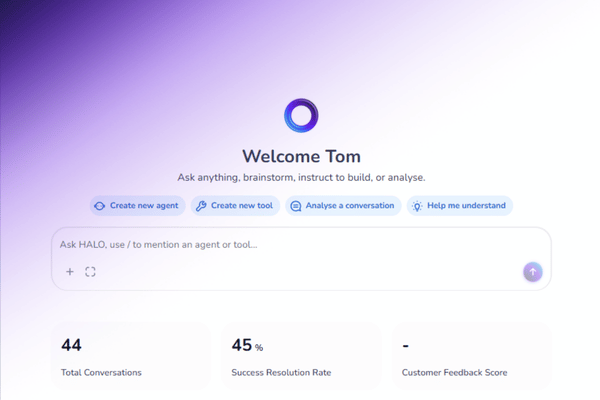
HALO, our agentic AI platform, works the same way. It can handle up to 80% of customer conversations autonomously and hands over to a person only when really needed. Two agents on HALO suit Black Friday best, on chat or WhatsApp, and both are part of our Black Friday offer.
Agent 1: The FAQ agent
The FAQ agent answers the repeat questions about delivery, returns, and terms. How long does shipping take? What is the return window? It works from the policies you give it and nothing else, so the answer a customer gets late on a Friday night matches the one your best colleague would give. If returns are your biggest source of contacts, our article on automating refunds and replacements shows how that flow works on WhatsApp.
These questions don’t need judgment, they need the right answer fast. When a question does need judgment, you decide up front that it goes to a person, and the agent hands over when it’s in doubt. Not everything should be automated, and we’ve written about the parts of customer service that should never be automated.
Agent 2: The Order Agent
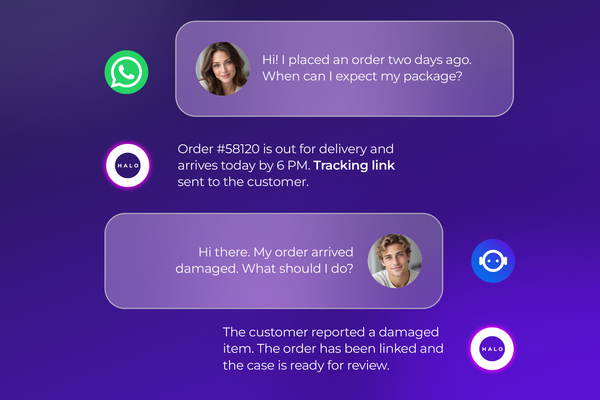
The Order Agent takes on the question that dominates every peak week: where is my order? It retrieves order information through your connected systems, so customers get a real status instead of a link to a tracking page. It also handles supported order requests, and where your integration allows it, it can change an order as well as look it up. This is where agentic AI earns the name: the agent acts on the request instead of only replying to it. Customers who follow up on WhatsApp can read more about tracking and order updates there.
You’ll see plenty of AI tools pitched for Black Friday, so ask every vendor the same thing: does it connect to my order system, or does it only answer from a script? An agent that can’t see the order can’t answer the question your customers ask most.
Stay in control of both agents
You define per topic what each agent resolves on its own and what always goes to a human. You can review every conversation, and you can test changes before they go live. Your data is stored and processed in the EU, and CM.com never uses it to train language models. For the bigger picture, read how to stay in control as AI becomes more autonomous.
How to get your customer service ready before Black Friday
You can prepare for Black Friday with any AI agent, and most of the work happens before you switch anything on. Five steps cover it. If you want a longer list, our AI agent implementation checklist goes deeper, and the Q4 customer service challenges article explains why peak season strains teams so hard.
1. Start from last season. Pull the most frequent questions from last year’s tickets and chats. The top of that list tells you where to begin: if “where is my order?” leads, start with the Order Agent, and if delivery and return questions lead, start with the FAQ agent.
2. Write your policies down. Delivery times, return rules, and terms should exist in writing before an agent uses them. An agent answers only as well as the information it gets, and this step often exposes rules your team has been applying from memory.
3. Check what your order system can share. An agent that looks up or changes orders needs a connection to your order system, so find out early what that connection can do.
4. Decide what always goes to a person. Complaints, exceptions to policy, and anything sensitive are common candidates. With HALO you set this per topic, and the agent hands over when it’s in doubt.
5. Test with real questions. Run last season’s actual questions through the agent, check what it does with them, and try the handover to your team before customers see any of it.
Give yourself weeks, not days. With HALO, setup and testing take about five weeks in total, three for setup and two for testing, and you can see how to create HALO agents step by step. Black Friday 2026 falls on November 27, and whether you’re live by then depends on your scope, your integrations, and how quickly the right information reaches us. CM.com can’t guarantee a go-live before that date, so starting early improves your chances.
Your next step before Black Friday
Black Friday will bring the same questions it brings every year, and you can’t change that. You can decide who answers them. Pick the question your team gets most, hand it to an agent, and keep your people for the conversations that need them.
Starting now leaves you time to test before the rush, and our Black Friday offer is one way to begin.
Frequently asked questions

It takes the repeat questions off your team. An FAQ agent answers questions about delivery, returns, and terms, and an Order Agent retrieves order information and handles supported order requests through your connected systems. Anything that needs a person goes to your team.
HALO works only from the information you provide and hands over when it’s in doubt. You decide per topic what it resolves alone, and you can test changes before they go live and review every conversation afterward.
Not necessarily. If the handover integration for your helpdesk is already available and suitable, your team keeps working in the tool it knows. CM.com checks this before you sign.
Both agents run on chat or WhatsApp, so you can start where most of your customer questions arrive today.
Plan for about five weeks: three for setup and two for testing. Being live before November 27 depends on your scope, your integrations, and how quickly the right information reaches us, and CM.com can’t guarantee a go-live before that date, so starting early improves your chances.